
Algordanza Order Form

The Problem
Algordanza is a Swiss-based global leader in producing memorial diamonds—transforming cremation ashes into certified diamonds. The Hong Kong branch has been using HubSpot to host their site, which served as a central hub for their customer information, order data, and marketing needs.
Despite this, Algordanza Hong Kong's ordering process remained largely manual and paper-based. Staff spent significant time on repetitive data entry and manually updating order progress. Additionally, numerous steps were required to liaise with different parties to complete each order.
The Solution
The goal of this project was to design a digital form solution that would simplify and automate the order flow, from integrating with Xero for payment processing to leveraging HubSpot CMS for automated lead scoring and pipeline tracking.
Timeline:
Dec 2024 - June 2025
Role:
Lead Designer
Responsibilites:
UI/UX Design, Client Training
User Flow Mapping
The project began with a comprehensive kickoff call to understand Algordanza Hong Kong's existing workflow, pain points, and business goals. As the lead designer, I was responsible for most of the client communication and collaborated closely with a team of developers, supported by my project manager.
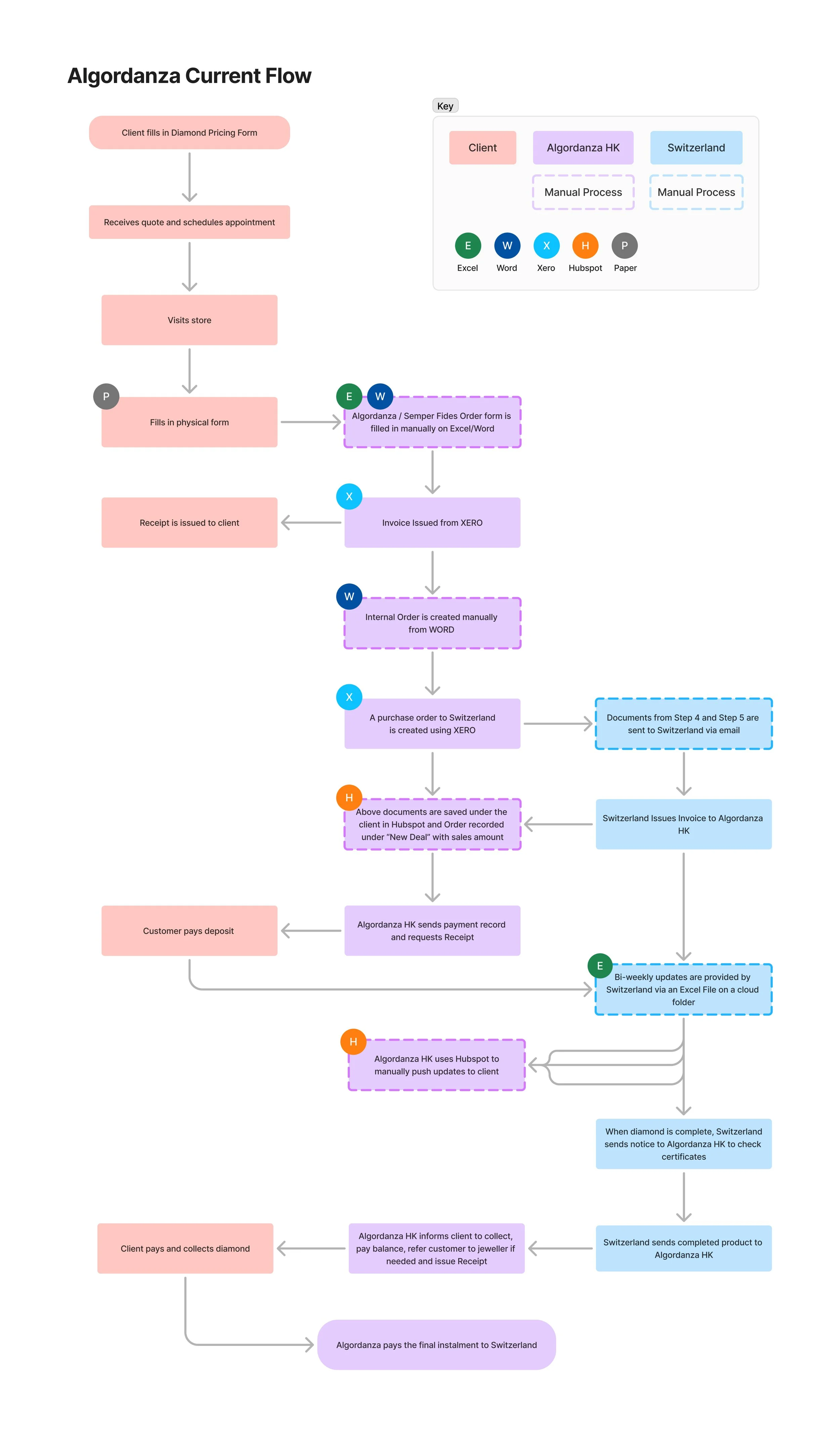
current flow
We started by recreating their current flow and mapping out all parties involved, including customers, the Algordanza HK team, Algordanza Switzerland, HubSpot, Xero, and Google Sheets.
Through this, we discovered that the existing order process required extensive manual effort across multiple touchpoints. Staff had to:
Manually enter customer and order data from paper forms into multiple systems
Manually create an internal order using Word
Manually enter payment information into Xero
Manually create a deal in Hubspot for a new order and update diamond progress stages to trigger email communications
Handle document submissions (e.g., cremation certificates) separately
Handle pricing for diamonds (include multiple diamonds and discounts) manually
All of this was inefficient, labor-intensive and created ample room for errors, delays, and inconsistent data.
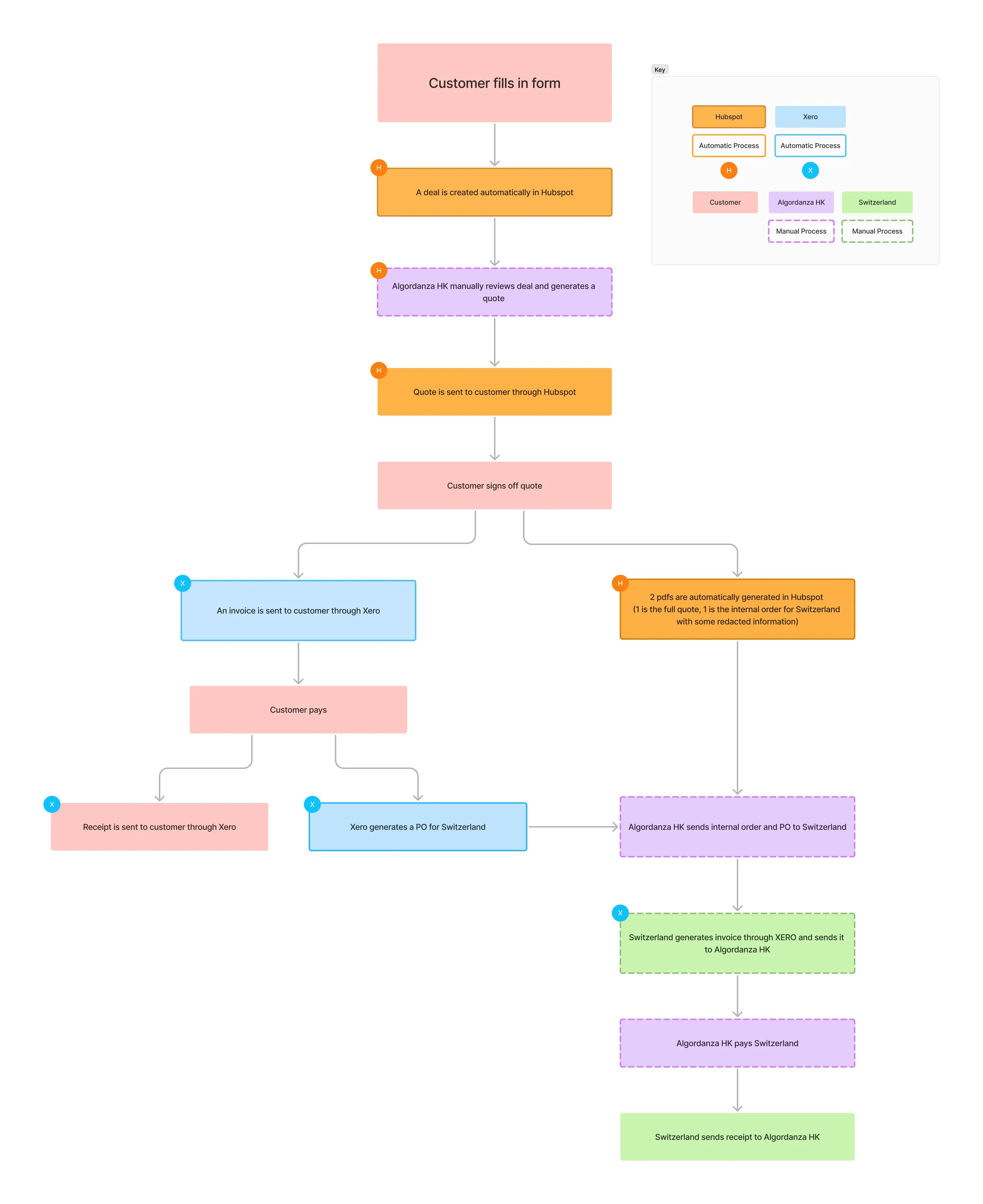
New Flow
We aimed to design and implement a new user flow that would simplify the process through automation and digitalization, reducing manual effort wherever possible. This included:
A new order form supporting bilingual use (English & Chinese), customer document uploads and can handle conditional logic, multi-diamond orders,and dynamic price calculations
Integration with HubSpot to trigger a deal creation, automating the sales pipeline by capturing prospect data and eliminating manual entry
An internal order and quote generation system in Hubspot
Integration with Xero for payment processing for both the customer and Algordanza Switzerland
Integration with Google Sheets for easy pipeline updates
Given the complexity, we had to consult with the development team and went through multiple rounds of iteration with the client. While not everything could be automated, the final improved user flow we came up with significantly reduced the number of manual steps required.
In the new flow, once the form is submitted, a deal is automatically created in HubSpot—eliminating manual data entry and automating their sales pipeline. Staff simply needs to review the deal and then generate an internal order and quote sent to Algordanza Switzerland and the customer respectively. After the customer signs off, an invoice in Xero will be created and once payment is made, a purchase order for Switzerland will be automatically generated as well. Staff would then send the purchase order to Switzerland who would then send its invoice through Xero.
Algordanza Switzerland would then update the diamond progress in the Google Spreadsheet file, which would then automatically trigger the email to inform customers.
By connecting HubSpot and Xero directly and using a single digital form as the entry point, the new flow ensures that data is captured once and propagated automatically, no longer requiring repetitive manual entry. The result is a faster, more reliable, and far less error-prone process
Key Considerations for the Form
After finalizing the user flow, the next step was to start working on the form itself. There were two different forms we had to create for Algordanza: one for memorial diamonds for loved ones and another for memorial diamonds for pets. This was because the ordering process, pricing, and diamond options differed between the two and the pet diamonds were produced by a sister branch of Algordanza.

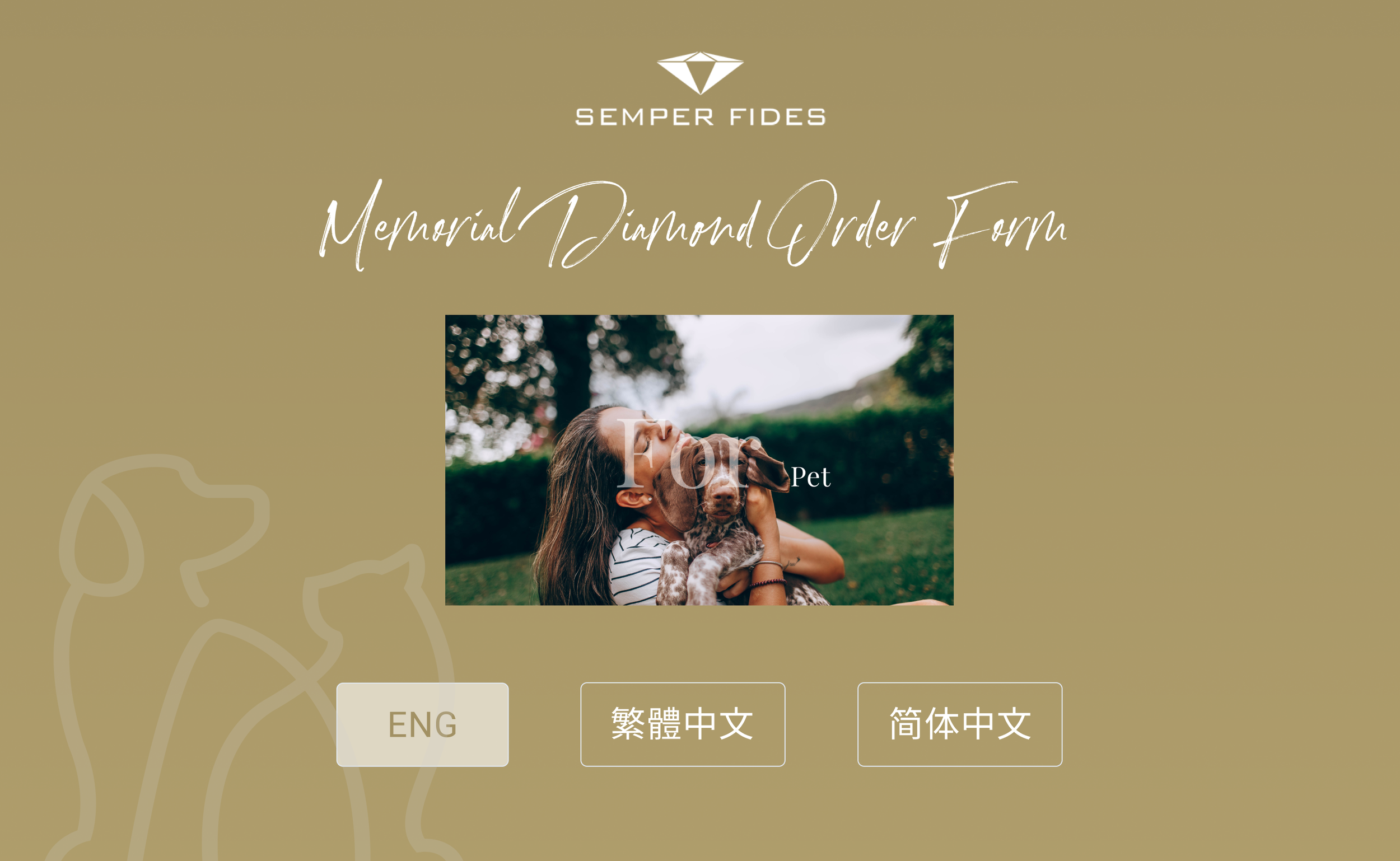
Algordanza HK had multiple existing paper forms and wanted to revise the content to better reflect the organization's current needs. So we first consolidated everything and confirmed the content for both forms—transcribing questions from the original paper forms while adding and removing certain fields as required.
Although there were differences in the content, we decided to keep the overall design consistent for both forms, with minor color and branding variations. So we focused on getting the Loved Ones form confirmed first, before duplicating the design and changing the necessary parts for the Pet form later. We would also be completing the English versions of both forms first, translating the text during the development phase.
Wireframes
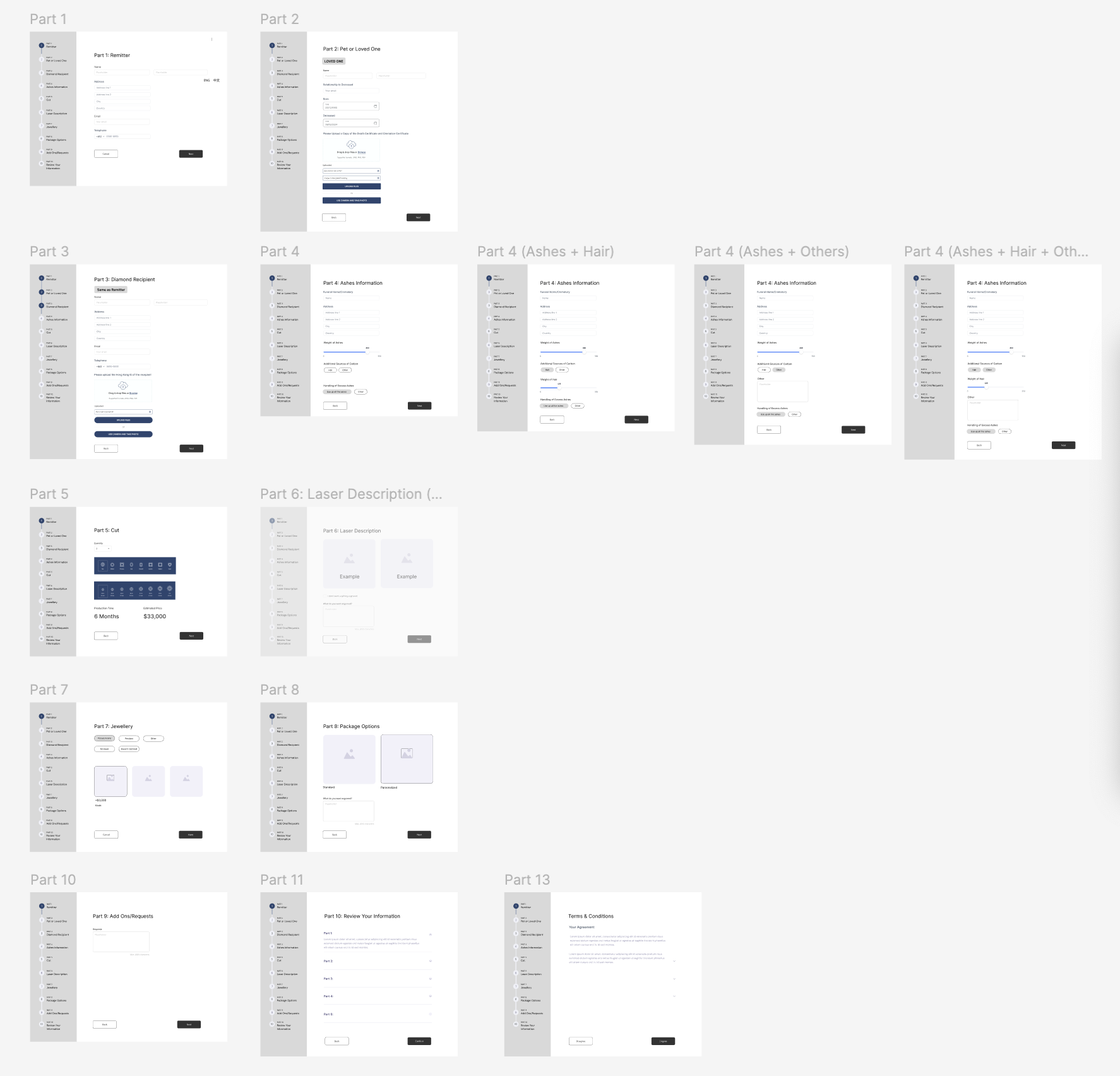
While we were using Hubspot as the base for the form, it would require a customized design and coding for what we wanted to achieve. So we started with creating low-fidelity wireframes to get the overall structure and design of the form confirmed first.
The main objective was to create a clear, readable form that would not overwhelm customers—especially those navigating grief. Since the original paper form was already broken into sections, translating it into a multi-step digital form was a natural fit. Because the form is quite long, we added a progress bar intended to allow users to freely go back to previous sections. I chose to position the progress bar on the side rather than the top to prevent the page from becoming overly long and to avoid excessive empty space on the sides. We also included a final summary page displaying all questions and answers, so users could review and edit their information before submitting.
High-Fidelity Designs
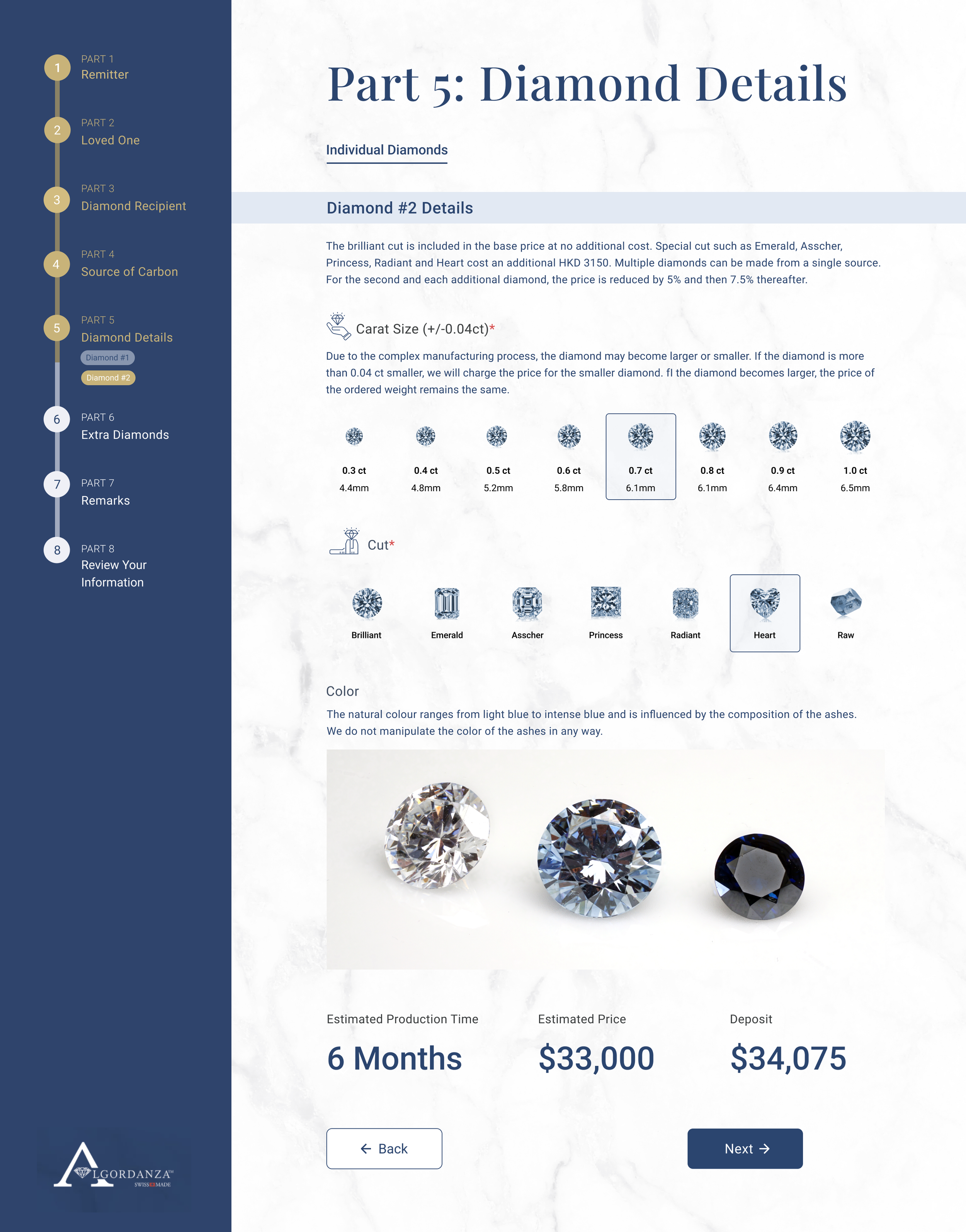
Visual Design & Layout
After refining the design with the client, I proceeded to develop high-fidelity prototypes in Figma, utilizing its capabilities to create clickable content and demonstrate conditional rules to make the logic understandable for both developers and the client.
I used Algordanza's and Semper Fides brand colors to highlight the progress bar and added a subtle background texture to make the form more comfortable on the eyes and more aligned with their existing branding. These color elements also helped break the monotony of lengthy content.
With the sidebar and form fields in place, I had to carefully balance layout and spacing consistency. I started by laying out the images for Carat Size and Cut to see how they could fit in a single row, then worked backward to establish a grid. Some pages had different numbers of fields, so I adjusted content spacing accordingly to avoid inconsistent layouts and to balance negative space—ensuring the design never felt too empty or too overwhelming.
To account for scenarios where customers ordered multiple diamonds, I included buttons in the progress bar under Part 5: Diamond Details, which were also designed to be clickable.
Conditional Options
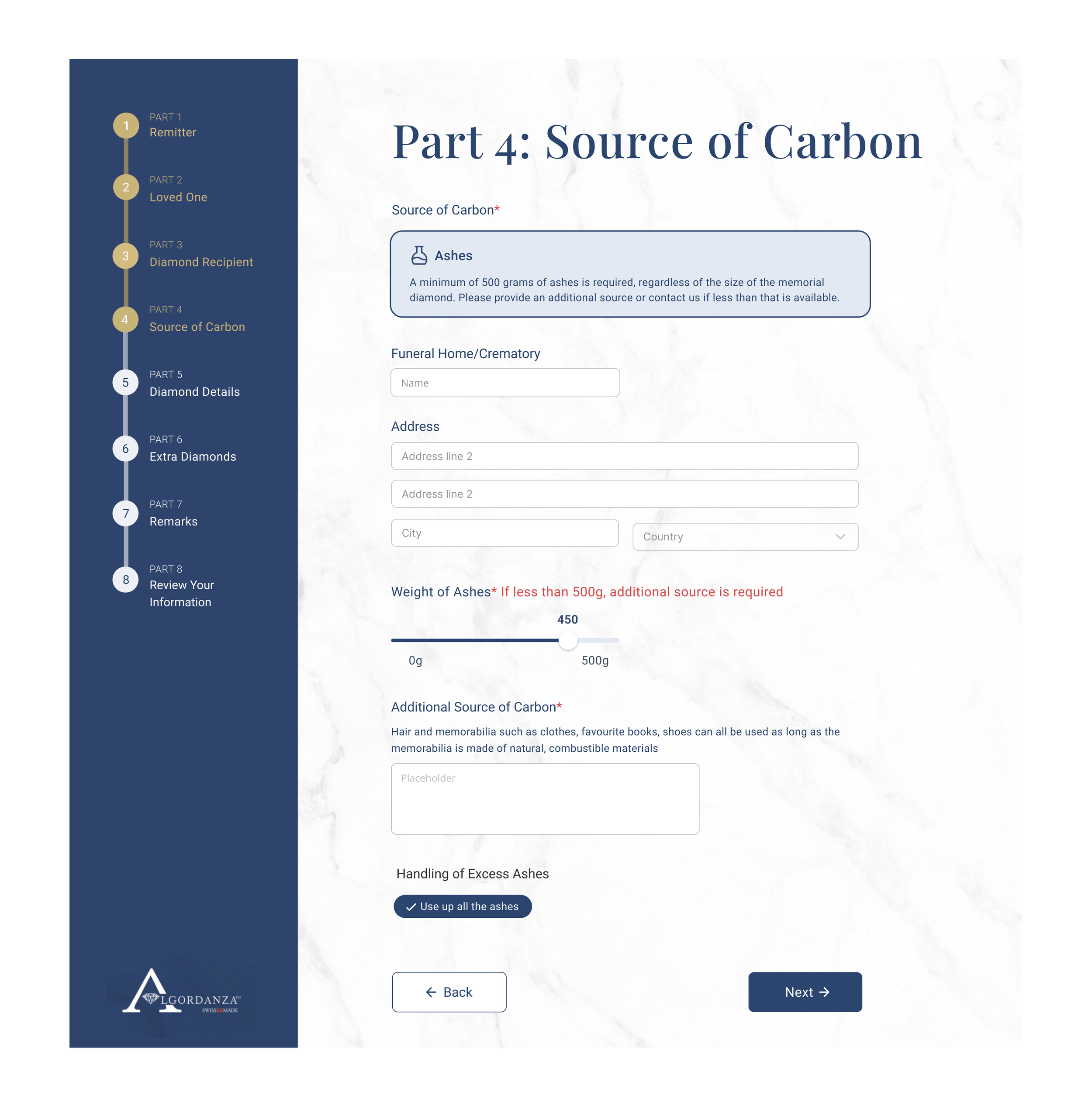
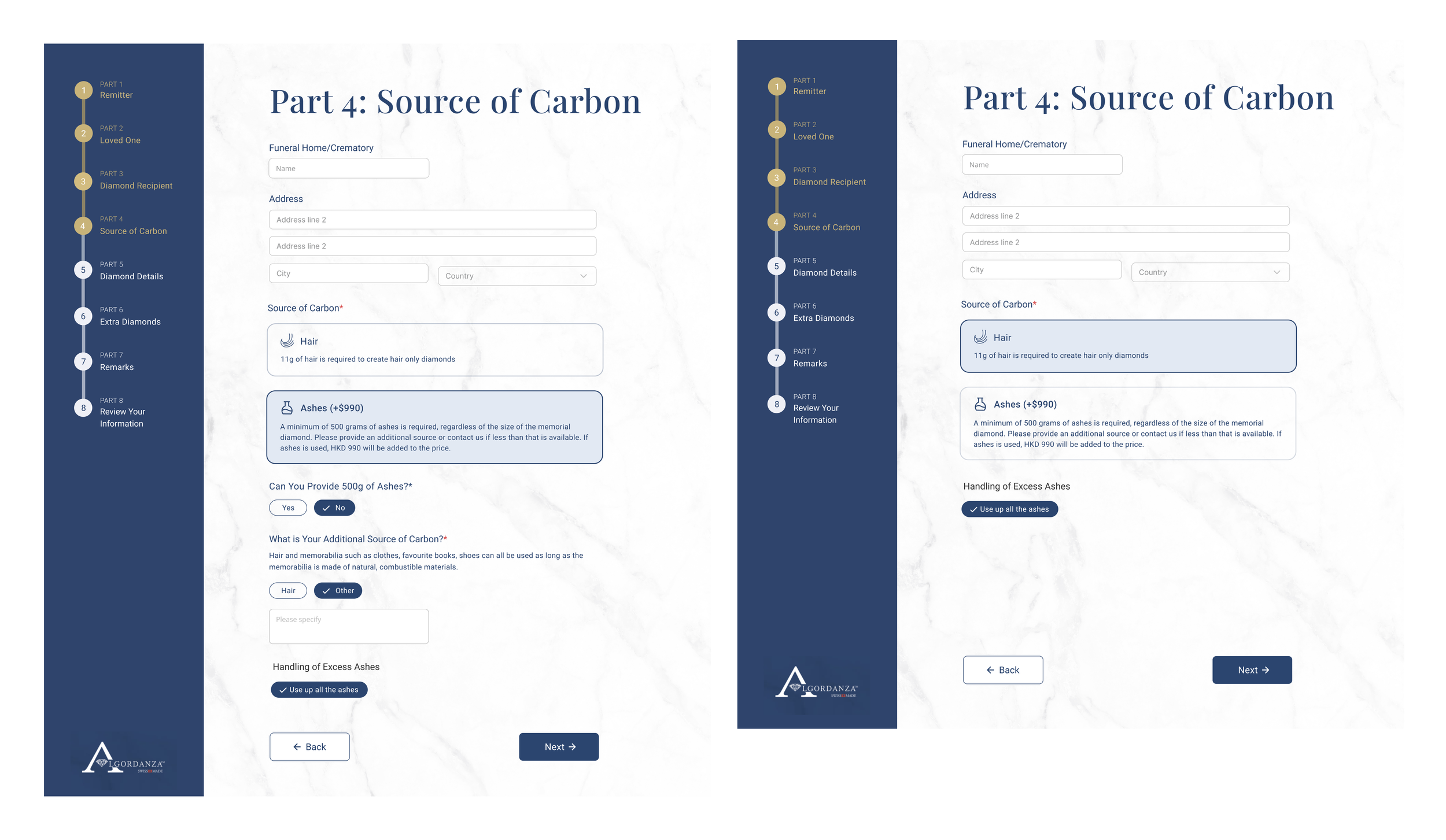
A big challenge for the form was designing the conditional options for the source of carbon, as it directly affected the diamond’s pricing calculation and needed to be clearly stated for order reference as well.
We had initially proposed using a sliding bar for the weight of the ashes in the Source of Carbon section, but after the Loved Ones form was complete and we moved on to designing the Pet form, we encountered some issues and the developers also expressed some difficulties with doing the price calculation using our current method.
After going through a few iterations, we ended up deciding to simplify it by only asking customers what type of source they wanted to use. If they chose ashes, we asked whether they had enough. If they didn’t, we asked for their additional source, giving a selection choice of ‘hair’ or other. Removing the precise quantity input made the backend logic easier to manage. We also switched to having the ‘hair only’ diamonds as the base price, while choosing ashes will have an added cost, as there are other potential discounts to manage.
Full Prototypes
Mobile Design
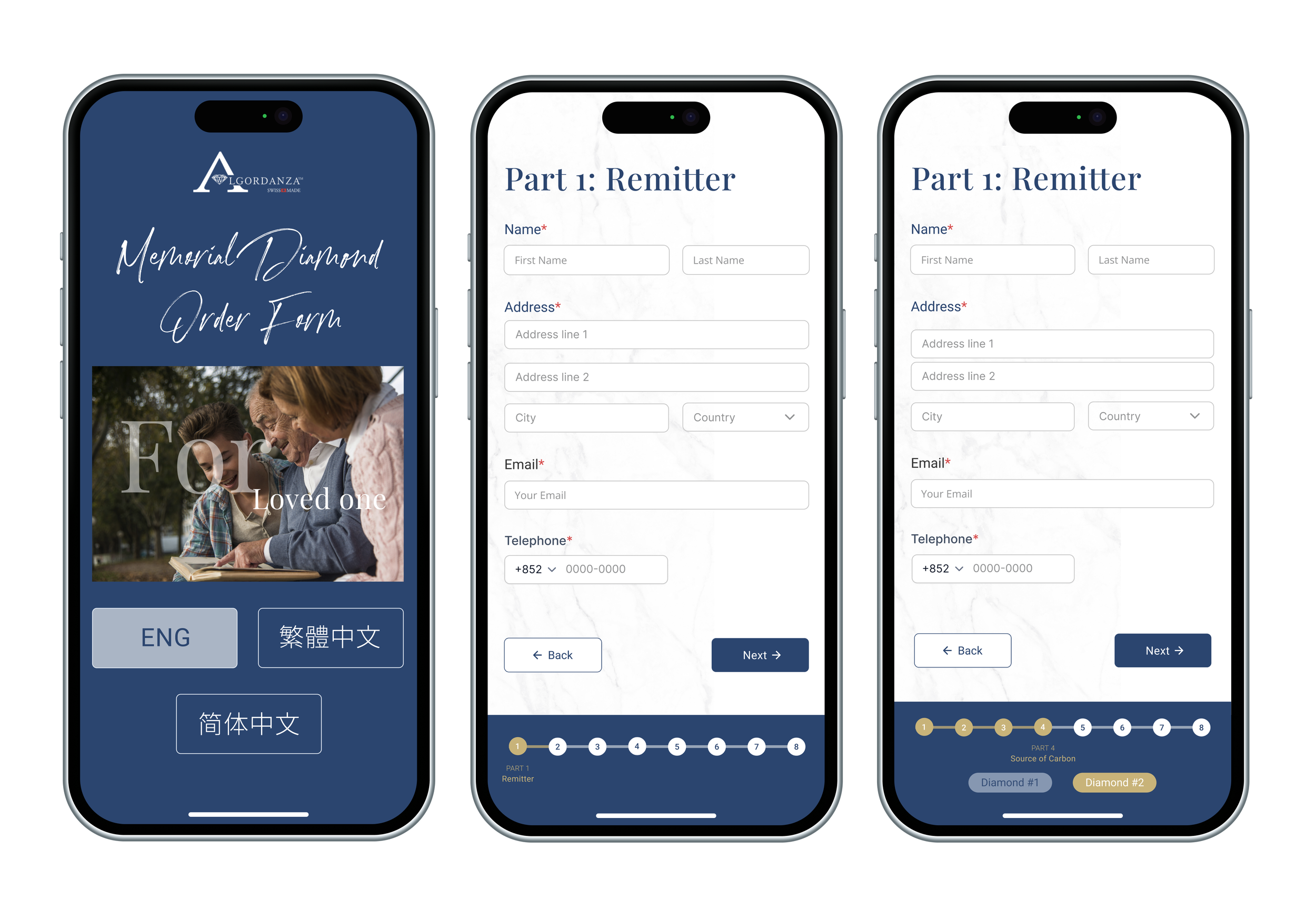
To save time, I created a few select pages to establish the grid and layout system rather than designing every mobile screen. This served as sufficient reference, giving developers everything they needed to implement the rest consistently.
The biggest challenge was adapting the progress bar so that it remained readable and clickable without taking up too much screen space, especially with the additional diamond tags. After several iterations, we arrived at a compact solution that preserved functionality while respecting mobile constraints.
Form Testing (UAT)
Upon approval of the designs for both forms, I facilitated the handoff of designs and assets to the development team who proceeded to build the form in Hubspot. After that, we proceeded with the UAT for the form itself. This took quite an amount of time, as we had to conduct multiple rounds of UAT, working closely with both the development team and the client to resolve issues. Even the smallest of details, like validation checks, wording, pricing, logic and functions needed to be double checked. We also had to check the desktop and mobile versions and the English and Chinese versions of both the forms separately.
One of the more complicated parts of the form was including price calculations and multi-diamond orders, as choosing an additional diamond would result in a discount and different sources of carbon would have difference prices as well. As our agency functioned as the liaison between the developers and the client, it was extremely vital to iron out all the details on the technical side and validate that it was functioning correctly. Throughout the whole process, I closely collaborated with the development team, ensuring accurate implementation and conducting rigorous quality assurance testing to meet functional and design requirements.
Integration Testing (UAT)
Once the form was fully confirmed, the developers started working on the technical end and integrating the rest of the order flow. For this, I created an order summary template (quote) to be sent to the client and an invoice template to be sent to Algordanza Switzerland. While I had less involvement in this process, once they had completed the integration, I was required to test the order process and make sure it was working smoothly.
This was a big challenge because it required a lot of testing to make sure that all the steps were working properly and all the data was being synced properly. As there were multiple vendors involved, we encountered a lot of technical issues along the way and it took a lot of back and forth and a significant amount of time for everything to be properly ready.
To conclude the project, I recorded an end-to-end process walkthrough for the client’s use, so they could understand the different steps required to complete the order flow.
Here are the final steps of the new flow:
Part 1: Hubspot
After you fill in the form, go to the Deals section in Hubspot
Rename the deal to your preferred order/reference number (This will appear in the internal order and quote)
In the left sidebar, scroll down and select ‘Yes’ under ‘Create Quote’.
Refresh the page and the internal order and quote will be automatically generated as a PDF that you can attach in an email
Click ‘Yes’ under ‘Raise Invoice’
Part 2: Xero
Go to Xero and under Invoices, you’ll see the invoice has been split into two
Add the payment to generate a receipt and a purchase order
Go to the Purchase Order page to see the created purchase order and manually change the currency and costs as needed
Part 3: Google Sheets
Lastly, you can update the order status using this Google sheet which has been linked to Hubspot. When you input the order information and add the dates for each stage, it will automatically update it in the Algordanza Order Status pipeline and the status update email will be sent.
Conclusion & Reflections
Technical difficulties made this project longer than anticipated, but in the end, we were able to successfully help Algordanza transform their ordering process on both the customer and business sides—saving them time and streamlining their workflow.
This was one of the first projects where I was deeply involved in the technical and testing side with a strong UX focus. As the lead designer overseeing the project from start to finish, I needed strong technical knowledge and developed a deep understanding of every step in the process. I also learned valuable lessons about understanding user needs and translating pain points into actionable design improvements.
More than in any previous project, feedback and testing proved absolutely vital. In form design, where UX is critical, every tiny detail mattered. After each UAT round, we would often discover small issues we hadn't anticipated—something missed or overlooked. The UAT ultimately consumed the most time in the project, requiring multiple rounds and close collaboration between the development team and the client to resolve issues.